

Guides
Using the tree viewer
rcf audit view serves the document chain as a live, read-only view in your browser. This guide explains the tabs and how to run, persist and stop the server.
The tree viewer displays the documents your agent has written. This guide covers the viewer itself. Reviewing the tree explains how to assess the documents and request changes.
Open it the way you open any RCF verb, by asking your agent:
Open the requirements viewer for me.rcf audit viewStarts the local tree viewer at http://127.0.0.1:4373/, tabs for overview, requirements, architecture and build sequence. 127.0.0.1 only, no auth.
That starts a local HTTP server, at http://127.0.0.1:4373/ by default, rendering the on-disk chain under rcf/ as a tabbed review surface. It is read-only and writes nothing to disk: no static files, no export. The server watches rcf/ and streams every change to the open browser tab as it happens, so the standard way to use it is to leave it running while your agent works and watch the tree fill in.
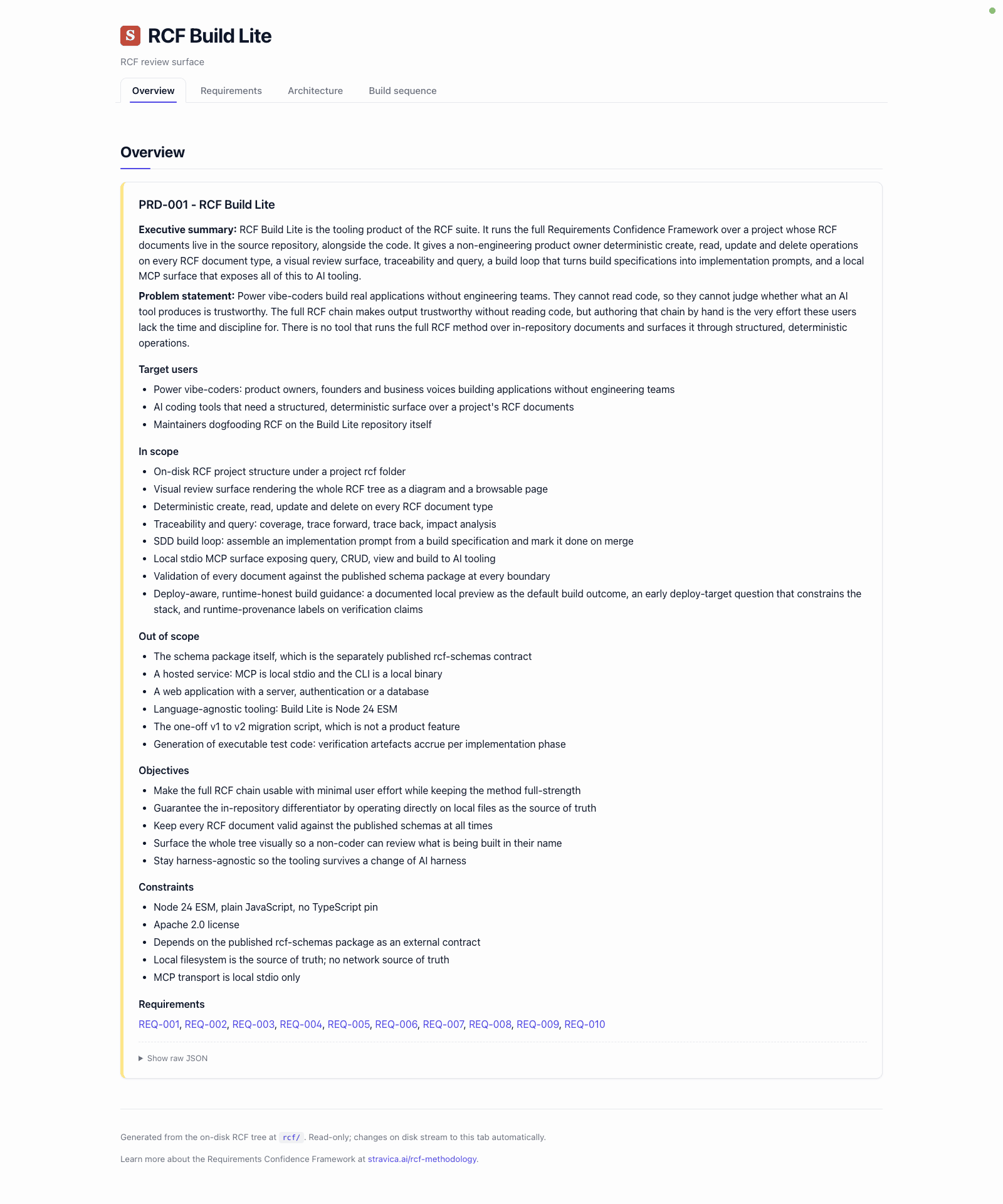
The five tabs
- Readiness. The product-owner command page. Five sub-tabs across the top: Overview (two verdict cards, a stage-by-delta grid where each cell carries pass, total, state and a failing-count link, and six count tiles for what the latest change added, changed, removed and impacted), Questions and Blocking (paired read-only tables with a shared stage and persona filter bar, a copy-for-your-agent control and a
#tab=readiness&...&entity=<itemId>hash scheme that lands on one row), Coverage (a stat line, a stacked bar, six family stat tiles and an unresolved-pointers table, plus a thin-requirements table whose rows say which requirement is thin and why), and Trace (a per-pivot matrix with rows for every user story and acceptance criterion under the pivot, columns for Suites, Cases, Build specs and Components, and cells coloured by reach and resolution). The freeze state renders in plain words that name the gates still failing and what resolves them, or (when ready to build) what a freeze would record. The tab readsrcf define readinessoutput directly; the viewer never re-runs the gates. - PRD. The PRD body: the problem statement, the objectives, and a summary of the requirements hanging off it. Collapsible lists with count badges, and a type-ahead jump input with area chips below the article.
- Requirements. The full requirement chain: each requirement with a slice diagram, its user stories and their acceptance criteria. A FilterBar (text, Area, Priority, Status, Needs-work toggle), Expand/Collapse all and a live count sit at the top; the FilterBar state mirrors into the URL hash so a filtered view is linkable.
- Architecture. The technical architecture document (six sections, each a collapsible row with the exact authoring command named for empty ones), the components (TACs) with their responsibilities, and the architectural decision records (ADRs). TAC and ADR panels each have their own FilterBar.
- Build. Two sub-tabs: Specs lists each specification with its acceptance criteria, approach, deliverables and context links, filtered by text, status, area, size and a Buildable-now toggle; DAG draws the build graph with depth-by-
dependsOnFbsIdscolumns and buildOrder rows, a critical-path highlight, a hidden-by-default unconnected lane with a visible count, and click-to-highlight closure (upstream and downstream outlined, rest dimmed) with a dependency inspector in the margin.
If JavaScript is unavailable, the tab bar becomes chrome and the five panels render stacked on one page. Nothing is lost, only the switching.
Fast ID lookup
From any tab, Cmd+F (macOS) or Ctrl+F (other platforms) opens the lookup modal: type any id or a few words from a title or snippet, and the viewer ranks matches across every REQ, US, AC, TAC, ADR and FBS in the tree. Enter jumps you to that document in the right tab. Cmd/Ctrl+Shift+F stays the browser's in-page find.
Light, dark or auto
The header carries a three-way theme control, Light, Dark and Auto, to the right of the FIND button. Auto follows your operating system setting. Your choice applies straight away and is remembered in this browser, so the viewer opens in the same theme next time; a ?theme=light, ?theme=dark or ?theme=auto on the URL overrides it for that visit. Both themes meet WCAG 2.1 AA contrast, and a test in rcf-lite blocks any change that drops a colour pair below it.
When the viewer is embedded in another page with ?embed=1, the control is not shown and nothing is stored: the host page sets the theme instead.
Local only, no auth
The server binds 127.0.0.1 only and has no authentication. It is for you, on your machine, and that is the whole security model: do not tunnel, proxy or port-forward it anywhere.
Ports
The default port is 4373. --port <n> beats the RCF_VIEW_PORT environment variable, which beats the default. A busy port is a hard failure, exit 2, not a silent fallback to another port.
Open the requirements viewer on port <n>.rcf audit view --port <n>Overrides the default 4373. --port beats the RCF_VIEW_PORT environment variable, which beats the default. A busy port fails hard rather than falling back silently.
Running it for longer than a terminal session
Plain rcf audit view runs in the foreground; its lifetime is your terminal session and Ctrl-C shuts it down. When the review outlives the terminal, the start subverb runs a supervised background server instead:
Leave the viewer running in the background for <duration>, and stop it when I ask.rcf audit view start --detach --persist-until <duration>
rcf audit view status
rcf audit view stopSupervised background server for reviews that outlive the terminal. --persist-until takes a duration (4h, 30m) or an ISO timestamp; an unrecognised value is refused rather than left running forever.
--persist-until takes a duration (4h, 30m, 2h30m) or an ISO timestamp; a value it does not recognise is refused rather than left running forever. status reports running, stale or not-started, logs prints the server's log tail, and stop shuts the background server down cleanly. On an interactive terminal, start detaches by default; in a script it stays in the foreground so nothing gets orphaned.
Stop the server when the review is done. It costs little to run, but an unattended local server with your project's full requirements tree on it is not something to leave up out of habit.
Where this leaves you
The viewer shows you the tree; the judgement about whether the tree captures what you meant is yours, and Reviewing the tree is the craft of making it. The verbs behind the other mechanical questions, coverage, trace and impact, are in the CLI reference.